Saturday, September 21, 2013

First Impression: BBM on Android Part 2

Okay, today is 21st September 2013. This is the day Blackberry promised BBM will be on Google Playstore. It is 22:15 and BBM is still not in the Playstore yet. Lucky me, a friend send me a link to download what seems to be a beta version of BBM for me to test. My apology to BlackBerry for testing it before it enters the market, but then agan it will help you marketing wise and who knows my input can provide some future enhancement for BBM.

The first time you open the BBM app, you will be ask to register yourself usng a valid email. Just follow the procedure and you will receive your BBM Pin. If you forgot to safe your in number, click your name on top to open this screen:


Click on Show Barcode to open this screen below and you have your pin there.


Note: All personal details of my friend and I are covered to protect our personal details.

Afterwards, you are ready to use BBM.

Warning: what I use is a working beta version, so the released version might be different, but the operation should not be too far from this beta version.

Now, my impression on BBM:

Initial Processes

The email registration to get the pin is a bit annoying, but all messaging apps are alike. It takes sometimes to finish the registration, so bare with it guys.

Screen Design

Simple, very BlackBerry 10 and easy to understand.


It is clear that the sense of menu organization style is totally different to most messaging app in Android. BlackBerry keeps everything as simple as possible, but they should think about not spreading the menu all over the place (hidden in right, left, and bottom panels). For Android users, too many hidden menu doesn't mean the app is cool but making it less accessible.

Also, the screen are only designed for smartphones, not tablet. I do hope the released version can compensate for tablet so user like won't have to turn the tablet back and forth. Please also note, some users are using smartpones that can be switched into tablets, like Asus Padfone.

Chat Screen


It's BBM. What can I say? Well, why is that emoji so tiny? Please remember that millions of BBM users are youngsters and elders and Android some smartphones' screens have higher resolution, some even reached over 1920x1080 pixels. BlackBerry needs compensate the possibility that the screen resolutions have different calculation of font sizes.

Other than that, the limited picture size is a breeze to download quickly. The message sending status is always the advantage over competitors.

Some Unstability

Maybe because I'm testing a beta version, but some unstability, if not weird functionality is happening. Mine is I cannot be invited, but I can invite others. Another friend can invite, but the acceptance didn't get through. Another cannot invite or get invited.

Background Operation

As usual, BBM is always running in the background so it will always be on. A small BBM icon will appear and stays there. In notification screen, it will state 'Connected' as its status. When you received a messege from your friend, it will appear as additional notification with your friend's name and profile pic appear to the left ofthe message.

Conclusion on Part 2

So far, BBM has created, accidentally or planned, a strong viral marketing in Android community, especially in Indonesia and India, a lot of peole cannot wait for BBM to arrive. Even BlackBerry's management down here has stated that their BBM will surpass WhatsApp or Line. That remains to be seen.

This first impression will continue on Part 3 when the released version finally downloadable in Playstore.

Thursday, September 19, 2013

First Impression: BBM on Android (and iOS) Part 1

BlackBerry on Android, must be the 'If I can't beat them, join them' kinda strategy. It is, since 2 years ago, the rumors of BlackBerry Messenger coming to Android has been floating like wild fire. It's not that it is an important move for BlackBerry, but ever since they lost their market and the failure of the numorous BlackBerry units selling as before in the market has put the in the corner of being one of the most high profile surrender to your competitors move. It was not the first time BlackBerry has done this, in the early years BlackBerry has given Windows Mobile (the years of stylus popularity) in April 2007. Now, September 2013, BlackBerry gives Android and iOS access to their so-called secure messeging channel of BBM. A new piece of historical milestone in technology industry.

Viral Marketing strategy.

BlackBerry has released a viral marketing strategy by throwing out a working beta version of Android apk in the Internet several times to create a buzz on BBM release on Android since last year. Recently, they actualy release a working apk downloadable in the Internet for those who are interested to try. This time around, potential users must provide email address to access their server and somehow it went through. The strategy relies on selected social media using tech savvy users.

What does this mean?

It is no secret that BB10 OS is not a success, the investment going into revamping the already dying OS by copying populars schemes, background, slide gestures and menu access are nothing new to Android, iOS and Window Phone users. The usage of soft keyboard to boost BB10 OS has not helped much. BB later released the old and tired physical QWERTY keyboard they popularized.
And as the closing statement, Research In Motion, the mother company changed their name to BlackBerry, and recently release a statement that in November they will announce the name of the company that will 'buy' BlackBerry.
BlackBerry, the giant, has fallen to a fruit and a little robot that took over the world.

BBM on Android and iOS Feels and Look

Let's just say it won't change much, but the looks has been long copied and now copying the competitors to gain popularity, which is a major failure. I tested the so-called beta version without beng able to access the server. It's stuck on Setting Up BBM cycle since the server is not up and running yet. One thing for certain, it will require min of Android ICS (4.0) anf iOS 6 to run BBM.


First Part Closing

I can respect BlackBerry as company with a principle to provide continuous communication solution to their users commitment. Even if there is a possibility that their company and technology will be destroyed by the new owner, they released BBM to the masses for continuous service for at least another year or two. As announced, 21st September 2013, everyone using Android can download BBM from the Playstore, iOS iTunes later that week.

BlackBerry is a sore winner, but at least they are a sore loser.

Friday, August 30, 2013

Service Center Adventure Report

As you might know, I have been using various brand of mobile phones: Motorola, Apple, Samsung, BlackBerry, HTC and Asus. Part of buying a new phone is also to know what and how is their Service Center works. If your phone has problems, you ight need to face them.

Here are my Reviews on branded phone and their Service Center:

1. Motorola

I have used Motorola Milestone, the GSM version of the original Motorola Droid for international market, for about nearly 2 years. It was my first Android phone.
The phone unit is heavy for its size, being made mostly from metal. The physical keyboard added it's weight. However, I have never have any problem with this unit and never sent it to service center. Brilliant product.
However, Motorola Service Center in Indonesia can be considered rare and hard to find. I don't know whether they are confident of their products or just too expensive to open more.

2. Apple's iPad

Well, it's obviously not a phone and don't make calls. But it is a gadget using SIM card and mobile Internet, so I put it in this list.
Service Centers are spread well. Easy to find also, like in Ratu Plaza, Roxy and Mangga Dua. However, the spare parts are too expensive, the service time is too long coz they need to send it to Singapore.
Unit itself is sturdy as long as you don't drop it. If you do, you're out of luck and need to prepare for the headache of expensive replacement spare parts.

3. Samsung

My first Samsung smartphone is Samsung Galaxy Note N7000, I bought it at its launch after waiting in a long line.
Out of all the service centers, Samsung is probably has the best valued service centers. Easy to find, service is adequate, if not better than competitors, and considerably Fast. Faster than competitors. In max 4 days, you either get your phone fixed or get to know when it will be done. The spare parts, although some are expensive, are reasonably priced. You know you bought a good phone that gets the best after sales when you buy a Samsung smartphone.
Samsung Galaxy Note is famous for having charger USB connector problems. Mine was the power input board got fried. So know it and be prepared.

4. BlackBerry

Fast, but illegal. Confused? BlackBerry, like other American companies, underestimate the huge population number of Indonesia, hence they don't immediately open a Service Center. So tons of non-motorized service centers Pop out everywhere. If you want the authorized service center, your unit will be sent to Singapore.
About 5 years ago, they finally open an office in Jakarta and has several authorized services centers. Nice strategy, fast service means losing your warranty. But for customers, bad after sales services for years and years
All BlackBerry units have problems with the pointing tools, track balls or track pads.

5. HTC

Among all, I must congratulate HTC as the worst service center for international companies, even worse than the local ones.
The staffs are polite but always ask to wait. My phone was held for repaired for 2 months and was asked to wait for another month. Apparently, this happens all over the world. Better avoid HTC if you can.
HTC always have spare parts problems, whether it's the screen or the charger connector or whatever. However, they do creatively build a functional and useful smartphones among all brands.

6. Asus

Asus Padfone 2 can be considered a successful smartphone / tablet. However the unit is easily damaged. You dropped it, just cry and don't bother to repair it. The spare parts are expensive.
The service staffs are very friendly and they always do what they promised. However, Asus internal procedure is slow. It took them 1 week to diagnose the problem, 1 more week to repair it if they have the spare part.

7. Nokia

Is probably the most experienced and the most professional among all smartphone service centers. Their service centers are located in the busiest phone reseller centers and each region has at least 1.
You probably need to wait in a long line cause they have the most units of mobile phones sold, but the service is quick, polite, spare parts always ready, and reasonably priced.

I put Nokia Service Center as the best smartphone service center in Indonesia.

Other brands that I have not been able to review is Sony, Huawei, ZTE, and LG. I have never used any of their devices so it's not fair for me to review them.

So there, those are my reviews of smartphones' brands' service centers. Feel free to leave any comment and share your experience also.

Thursday, July 25, 2013

First Impression: Google's Chrome Cast

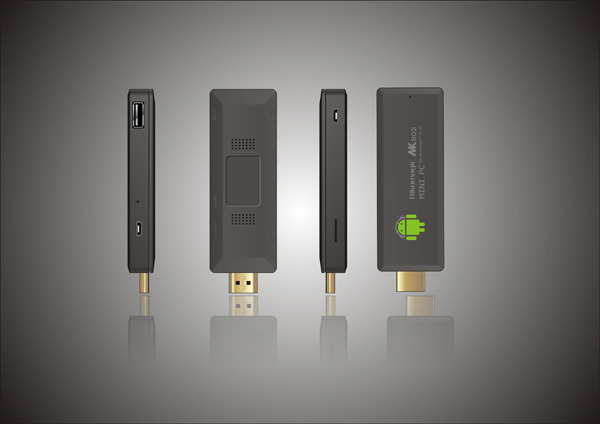
Incredible, I have waiting for Google class product(s) that will make a regular HDMI capable TV into something more than just a "dumb" TV, and here we are. As I have predicted in January, an Android thumb size internet TV enabler will be the game changer, it has. Although the China's Android mini PC didn't hit the mark due to over heating and easily bricked component, like the picture below, their development continues to quad-core class processor.


Now, mid 2013, Google finally release the new Chrome Cast. Of course, Google starts the basic with WiFi based connection and streaming from your devices: smartphones, tablets, or PCs, as long as you have Google Chrome, that means iPad, iPhone, iPod Touch, Linux, Ms Windows, but no BlackBerry). The connector is HDMI so it is universal, giving the stream a HD capable presentation, limited only by your WiFi bandwidth.


Is Google too late? Yes and no. Yes because Apple has thrown out their Apple TV, Samsung has perfected their AllShare Dlna connectivity, Sony has improved their cross smartphones/tablets to TV sharing using WiFi in combination with NFC, and China's produces Android microPC like chocolate bars to push regular HDMI capable TV into Internet Smart TV. No because Google needed the time to perfected the micro system of connectivity and usability. With the new improvement that Sony has released few months ago, Google finally has the methodology of easy connection and streaming quality multimedia from Chrome enabled devices to TV.

Is it great? Not yet. It still needs time to develop further with services and stability. Google didn't joke around and dump power supporters into Chrome Cast.


These included features (Netflix and all Google products/services like YouTube, Music, etc) are the one that will drive new generations to buy this product. Of course $35 a pop is certainly an Apple TV killer on the loose.

Here are the nagging question: why don't Chrome Cast has a mini/micro SIM card slot to enable independent connectivity? The answer lies on whether or not you want to carry around your HDMI capable TV? Obvious, isn't it?

My nagging question is, why not propose Chrome Cast to HBO Networks, Fox, Warners, and others alike as the subscription tool? Here goes the death of TV Cable and the rise of Broadband and WiMax providers.

Of course, these all are predictions and still to be seen in the future. Why not share your comment and we'll discuss this further.

Review: Tubemate - YouTube Video/Music Downloader

You like a video or a music video on YouTube and you want to keep it? In Windows or Mac OS, it's easy, tons of YouTube downloader exists, most for free. How about for Android?

Yes, there are. One in particular I found stand out better above the rest: Tubemate.

You can not download Tubemate from Play Store because it is not a Google approved application, and you need to set your Android device to be able to install apps from third party source first. The way you can down load Tubemate is to go to www.google.com and search for Tubemate. Download then install it. Easy.

Tubemate basically functions as alternative app to access YouTube mobile website.


See the green arrow at the bottom of the screen, press the button and you will be able to download the opened video from YouTube.

The advantages:
- easy 1 touch download
- high speed dowanloader
- choose the video resolution size to download, the bigger the resolution the clearer the video but larger size
- you can pause downloads, resume whenever you want
- directly convert the video into MP3 (128kbps MP3 quality)
- can access non-mobile videos
- if you sign in to Google in YouTube, your subscription is accessible
- you can share your video

The disadvantages:
- battery hog
- internet quota hog
- tends to block other apps' internet access when downloading at lower Internet speed
- MP3 at lower quality conversion
- video downloads are only in MP4 and FLV formats

Why not try Tubemate if you want to safe locally any YouTube video. Easy to use and versatile.

Review: tTorrent

Torrent? Well, like Windows system, Android also has torrent downloading apps to be used.

I found among all the existing torrent app in Play Store, tTorrent to be the best app available, and apparently the first to include search and download features in a single app.


If you search the Play Store for torrent, you will find tTorrent at the top 5 in most countries. In the screen shot, it is number 3.

tTorrent advantages:
- built in search (you will be ask to download search engine at first search, download it)
- it connects to several popular torrent servers: bitsnoop, isohunt, pirate bay, limetorrent, extratorrent, etc.
- free version can have at max 250 kBps download speed
- you can set tTorrent a certain number of download torrent simultaneously, remember 250 kBps is split to the number simultaneous torrent download actively running
- limit upload speed, by default it has unlimited speed but you can set it to specific speed at min 5 kBps
- can be set to shutdown after download completed
- good news, Windows' viruses don't work on Android
- automatic saving at stop point should the internet connection got cut off, whether it is caused by power drain or just broken connection
- share magnetic link
- easy access with torrent file

Disadvantages:
- battery hog
- tends to overheat the smartphones
- beware of virus, malware and spyware (not all anti virus can detect them)
- beware of fake files
- if you use quota based internet, it will drain your quota like a gold-digger

Why use tTorrent?
- to sample music before you purchase the CD/DVD
- to sample movies before you buy the collectible version
- to sample software before buying the license

Of course for every good thing, there is a bad thing also. I don't know whether by reviewing this app, tTorrent will have problems with Google or not, but so far I found tTorrent to be the best torrent available in Android so far. Try it, maybe you like it. If you like it, don't forget to buy it. Support the maker.

Tuesday, July 23, 2013

Review: Quick Keyboard Switch

When you have at tablet, switching from landscape to portrait and vise versa sometimes causes problems in the form of keyboard functionality. In my case it gets worse since my Asus Padfone 2 can switch from smartphone OS to tablet OS. The problem is that smartphone keyboard buttons are too small for tablet, while tablet's keyboard buttons are too big for smartphone. Unfortunately, not all manufacturer provides settings for this small unforeseen necessity.

Solution a small application called Quick Keyboard Switch. This app practically a link to open up local & input setting by adding home screen widget, notification widget or just direct access to the app itself. That way, when you are to tablet or to smartphone mode, all you need to download is to quickly change the keyboard you want to use in each mode, without the need to go through the settings levels.


It is useful when you need to answer your email or editing a document quickly, since you can access it from notification pull down/up menu.

Quick Keyboard Switch has 2 versions available, free (with ads support) and paid version. Try the free on and start doing your typing quicker and easier.