Thursday, March 27, 2014

Budget HeadFi Fun: Hunting for under $100 Headfi

Long, long time ago, well almost a decade to be exact, I found my first headfi headphone: the powerhouse Sennheiser HD-477. It's the beginning of a love affair that I didn't expect to last such a long time.

2014, with a new office came a need for a new budget HeadFi piece to stay in my desk drawer, ready to serve me anytime. But being in an open space office, a close full size headphone is ideal. My trusted favorite Ultrasone HFI450 is my first choice, but I don't have the heart to leave it back in my desk drawer. There it began my hunt for a new closed headphone, it must have sound so good that I want to use it, but cheap enough to leave it behind in my office drawer.

After months of search without result, I have tested several budget headphones and ended with a collection of sound signature in my head that I love but at the same time didn't get selected. Here are theorist of candidates:
1. Panasonic RP-HX550
2. Sennheiser HD 202

As my player, my trusted SanDisk Sansa CLIP+ 8GB.

As my reference: Audio Technical M-50

Since I have not selected.any one of those 2 headphones, I keep on searching.

My review, or rather my take, on the 2 candidates:

1. Panasonic RP-HX550


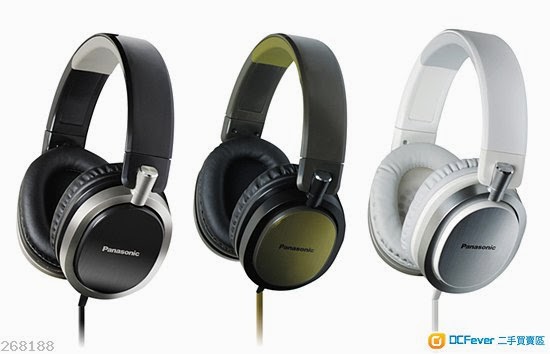
Just being.launched in 2014, Panasonic new headpiece the RP-HX550 is definitely my biggest surprise. Found by accident while trying to go to a Men's Room in a mall in Jakarta, the HX550 looks inviting with those brushed metal finished on closed plastic earpiece look stylish and definitely worth to test. At $80, I would consider it a bargain.

First Look Impression: nice finish with the plastic and metal material combo. The single wire connector with a flat tangle-free cable definitely add to its premium style.

First Sound Impression: Wow, V shaped equalizer
High - smooth and detailed, it didn't register as high fidelity high, but it is at participating with the like of Sennheiser HD 202 with a winning smoothness. For those looking for detailed smooth sounding high frequency in headphone, this is a keeper.
Mid - the singer voice is less focused and rather weird sounding. I would not recommend HX550 to voice headfi lovers.
Low - I am shocked by the sound, a good shock. It is clear and deeper with more details than expected from Panasonic headphone, especially consumer version. Don't get me wrong, HX550 is a warm headphone with a touch of treble details. Definitely a keeper for music lover, but not for voice centric lover. Lower in fun (bass) and details compared.to Audio Technical M-50, but details and soundstage to.match M-50.

2. Sennheiser HD 202


Bass monster on-ear Sennheiser HD 202 definitely will satisfy bass lovers and also superior in details.compared to Beats headpieces. Being closed unit, HD 202 has straight forward sound, especially compared to the older brother that I happened to own HD 477 (open headphone with better details and soundstage).

This headphone felt like I was wearing subwoofer for a.headphone. Bass details are replaced by bass explosion, a powerful one that is.
High - sweet
Mid - good
Low - powerful volume and impact but lacking.details
I would say inability to deliver details of music is what made me doubtful, especially compared to M-50.

Which will be my earpiece? I will let you know soon

Wednesday, March 26, 2014

Sony Xperia Z Ultra Hands On Review

Alright, for those who followed.this blog, you know that I'm a suckered for Samsung Galaxy Note N7000, aka the original Galaxy Note. In recent years, that is the smartphone that I used for over 18 months until it became too obsolete that everything become unbearably slow to operate.

2013 is probably the slowest year for me in regards of Android smartphones, except for 2 smartphones: Asus Padfone 2 and Sony Xperia Z series.

I must say, those 2 enticed me with their creative solutions that I decided to buy Asus. Unfortunately, that was a decision that I regretted due to hardware flaws and weaknesses.

2014, I went backward and purchase the abdominal Sony Xperia Z Ultra, this 1920x1080-true-HD-6.44"-screen-2.2ghz-quad-core is the current record breaker of thinnest and biggest screen for a phone category.

As an old fan.of SGNote, stylus writing capabilities and features to support it are something that I yearned when using Asus Padrone 2 or my just retired Polytron Quadra HD. Sony creatively put an incredible amount features to their Z series, including their giant Z Ultra. Those features made my SGNote becomes a museum piece.

Sony Xperia Z Ultra exceptional and useful features (that I know of, and I believe I will find more soon enough):

- Reading/Accessing portable hard disk
Z Ultra ability to access portable hard disk makes my life easier. I don't rely on transferring files using flash memory and computer anymore on the go.  However, accessing big capacity (1TB or above) portable HDD is proven to be hardwork for the unit since the limited electricity power Z Ultra has. Connection easily severed and lost power several time. Looks like there is a limit how long Z Ultra can.supply power to the HDD unit.

- Stylus replacement: pencil, pen, or anything made of iron
Did I hear a "Huh?" Well, it is unique. Sony decided that the users of Z Ultra are people who like pens and pencils so forget the stylus and go straight to use pen and pencil as stylus instead.  Brilliant decision with some risks like screen scratches etc. Solution, screen protector.
I also found out that Samsung C-Pen (not the same as SGNote's faithfull S-Pen), which uses metalized rubber, work like they were born for each other on Z Ultra.
With this feature, users can freely use almost anything to write, annotate or sketch on Z Ultra. Why bother buying a stylus then? Well, users will still need stylus since pens and pencils will scratch Z Ultra screen surface in the long run.

- NFC Easy Connection
Whoa, Sony pretty much exploded NFC trends by applying easy connection features that now tons of NFC accessories are now available in the market. Samsung and HTC have NFC features.but they don't really put NFC as part of their main strategic feature.

- Dust and Water Proof
Sony might not be the first, but they certainly the one to  explode water and dust proof smartphones worldwide. I would.say shame on Motorola for not exploring Defy series further. Now, Samsung has noticed the.Zip series success and launch Galaxy S5 with water and dust proof feature.

- Power Management
HTC One was the first high end smartphone that featured this newer unique feature, however HTC limits this features to only One series. Sony produces almost every middle and top range of their products with Sony's stylized Power Management. Of course, HTC in turn quickly add more products with this feature and Lenovo follow suits to flood the market with affordable Android smartphones with Power Management features pre-installed.

- Being a tall unit with almost 2 cm/1 inch space on top and bottom of the screen means Z Ultra is the current best suited Android for gaming and multimedia consumption

What else can I say, last year I.made a mistake on deciding to buy Asus. This year Z Ultra has gone down in price and become my new favorite smartphone.

Of course there are some drawbacks:
- Painfully gigantic size for a.phone
- Flaps here and flaps there mean extra efforts required to access USB and the rest of the connections
- Glass (front and back) means scratches and fingerprint magnet, self explanatory here, Sony people might talk to Apple people a bit too much
- New screen means trip and error, luckily Z Ultra uses the 2nd generation 1920x1080 HD Triluminous Bravia technology so it is superior to the previous ones on Z, but not necessarily better than IPS and Super Amoled

Final words on my first 1 week living with Z Ultra, I fell in love and Z Ultra is definitely my concubine. Please don't tell my wife.

Wednesday, October 23, 2013

BBM On Android - The 1-Day Review

Alright, BBM is official and it's running on Android. It's not without tons of problems and hick-ups.  Basically, my marketing instinct considered BlackBerry is running a PR nightmare.

Here is my review for the 1-day experience with BBM.

Interface

It's cold and stiff. Even with the new design based on BB10 OS, BBM is too plain. Of course there are rooms for improvements:
- improve touch response
- inconsistent touch gesture access
- background customization
- less repetitive buttons
- larger emoticon (currently sooooo tiny)
- logical hidden menu
- cross apps sharing
- personalized status home page
- no tablet interface

The first thing I noticed was the hidden menu are repeating everywhere, such Invite button appears in 3 places despite 2 being hidden. So unnecessary, but it does hide the lack of additional features of BBM at first glance.

Fun factors when using the BBM is sorely missed. My wife is not tech savvy, but she immediately said she didn't like BBM within the first 2 minutes. Sure, BBM made Voice Note and Picture Sharing famous, but those are previous age features. Nowadays, messaging apps compete on video calls, video sharing, stickers, personalization, etc. The fun factors of messaging which make them "fun" to use.

And NO, BBM is designed for business is NOT a good reason for not including those features. It's like having a wedding cake without decorations, just the cake.

Network Communication

The legendary BlackBerry encryption and secure network is probably the only asset that BlackBerry has, which won't mean anything now with Samsung Knox and others producing similar security.  In fact, the communication slowed down by the process of cross network transfers.

A strange, if not a bug, anomaly is that BBM doesn't appear to have 'First In-First Out' traffic control over the messages typed in. Meaning if 1 message failed to be sent (maybe bad signal or interference), it will be sent later, much later than the next input you have typed in. This makes the conversation confusing to users and can cause misunderstandings. Business people won't like it. Even worse, those in romantic relationship will scream.

The Launch (Marketing Commentary)

Imagine you are launching a rocket to the moon, you will prepare everything and calculate every risk that can occur.  BlackBerry (previously RIM) should know that they don't have the infrastructure to contain to flood of users wanting to either use or try BBM, especially on Android environment.  Yet, the preparation was not well calculated. Disaster occured and they missed the launch event.

The second launch, they knew what to expect, again they failed to manage the risk. Instead of letting potential customers know ahead of tome there will be a line of waiting list for the pin registration, they just took it as it came to them. This mishap caused them loss of users. They should have more than 10 millions users within the first 10 hours if they managed it the right way from the beginning.  Blackberry is happy with nearly 5 millions users in 8 hours.  Even McDonald's gives us counters of how many burgers they served which is great PR for the Golden Arc brand.

Conclusion

BBM launch is a catastrophy and BBM is a major disappointment.  It's like witnessing an Ape Man walking in New York City.  BBM is still admiring the city, forgetting that they should have been the awe of competitors and users.

Will BBM survive the new messaging age?  If they are quick to improve BBM, maybe.  If their headstrong tradition dictates BBM is good enough, well, like I said before, we are witnessing history in the making. This is the 'do or die' time for BlackBerry.  Either we, the users, will attend a funeral soon or a celebration of success.

Tuesday, October 22, 2013

First Impression: BBM on Android - Official - Part 4

Finally, after false start, frozen server, damaged network, BlackBerry sold, re-announcement. It's here, BBM the official app for Android.

Here is the Playstore link: "BBM" - https://play.google.com/store/apps/details?id=com.bbm

It's free and still so many fake apps, so follow the link, you will be okay.

The Impression

Well, similar to the beta with minor revisions. Obviously, Smoother than the beta. However, with layer of network communication required for BBM to get connections, the app messaging is a tad slower.

The menu is simple. Swipe left to right for main messaging menu, right to left for specifically parts menu (like chat, groups, etc).


As for initial registration, for those who has registered, you can just login with your email and password.

For those who has not registered, follow the registration process.

If you want to change email registration, please delete the old one.

The process doesn't take long, compared to the previous version. Once you registered, you will receive your pin.


Use your pin to get added or add others with their pin. As for the precious and addictive groups, scan the group barcode to gain access to the group.

Turning on and off the annoying notification is also easy, by opening the group or person chat, Swipe the menu right to left or access it with the 3 dot menu button on left bottom corner. The toggle of notification can be found there.

Sending voice note and pictures are also smooth, without a hitch.

As mentioned, the only problem that I can notice, or you will soon notice, is the sending and receiving is not as fast as other messaging apps due to the multi-layers network connectivity: BBM App to Internet then to BBM network.

It's not an impressive app, but simple to run and you can get BBM connection.

It's a good beginning though, not major nor impressive, but BlackBerry has finally reopen the BBM to Android. That means BlackBerry, at least, did what they promised. So go ahead and use BBM, the original yet not the best.

Tuesday, September 24, 2013

First Impression: BBM On Android Part 3 - The Rollercoaster?

Is it on? Nope. In fact, BBM for Android and iOS got delayed again.

Some news has spread that it will be turned on again on 27th September, BlackBerry has denied the news and the stated it will not be this week.

Well, here is the rollercoaster ride. Today, both Mashable and The Guardian has released an article that BlackBerry has been sold to Fairfax Financial for US$ 4.7 billions. Fairfax Financial previously owned 10% of BlackBerry shares, now the sole owner. That means Blackberry stock was sold at $9. BlackBerry stock highest price was $128 in 2008.

So what's the deal? Looks like after losing eearly US$ 1 billion in 2nd quarter 2013 due to the failed Z10 and stumbling on the launch of BBM on Android and iOS, BlackBerry has lost more than just their pride. They have lost money, time and market confidence.

My opinion that Fairfax Financial will resell BlackBerry later on to gain higher price, meanwhile the money will be used to salvage whatever BlackBerry still has as their saving grace. Most likely to relaunch BBM on Android and iOS, and also paying the 4500 employees they said good bye to. If I work for BlackBerry, becoming the first 4500 now looks more promising than fighting with the sinking ship.

So my guess, we still need to wait the news of when BlackBerry is ready to launch BBM on Android. My guess is next month. Sorry guys, this rollersoacter is a bad news for now. At least, I was right, we are witnessing a milestone in history: the sinking of BlackBerry.

Saturday, September 21, 2013

First Impression: BBM on Android Part 2

Okay, today is 21st September 2013. This is the day Blackberry promised BBM will be on Google Playstore. It is 22:15 and BBM is still not in the Playstore yet. Lucky me, a friend send me a link to download what seems to be a beta version of BBM for me to test. My apology to BlackBerry for testing it before it enters the market, but then agan it will help you marketing wise and who knows my input can provide some future enhancement for BBM.

The first time you open the BBM app, you will be ask to register yourself usng a valid email. Just follow the procedure and you will receive your BBM Pin. If you forgot to safe your in number, click your name on top to open this screen:


Click on Show Barcode to open this screen below and you have your pin there.


Note: All personal details of my friend and I are covered to protect our personal details.

Afterwards, you are ready to use BBM.

Warning: what I use is a working beta version, so the released version might be different, but the operation should not be too far from this beta version.

Now, my impression on BBM:

Initial Processes

The email registration to get the pin is a bit annoying, but all messaging apps are alike. It takes sometimes to finish the registration, so bare with it guys.

Screen Design

Simple, very BlackBerry 10 and easy to understand.


It is clear that the sense of menu organization style is totally different to most messaging app in Android. BlackBerry keeps everything as simple as possible, but they should think about not spreading the menu all over the place (hidden in right, left, and bottom panels). For Android users, too many hidden menu doesn't mean the app is cool but making it less accessible.

Also, the screen are only designed for smartphones, not tablet. I do hope the released version can compensate for tablet so user like won't have to turn the tablet back and forth. Please also note, some users are using smartpones that can be switched into tablets, like Asus Padfone.

Chat Screen


It's BBM. What can I say? Well, why is that emoji so tiny? Please remember that millions of BBM users are youngsters and elders and Android some smartphones' screens have higher resolution, some even reached over 1920x1080 pixels. BlackBerry needs compensate the possibility that the screen resolutions have different calculation of font sizes.

Other than that, the limited picture size is a breeze to download quickly. The message sending status is always the advantage over competitors.

Some Unstability

Maybe because I'm testing a beta version, but some unstability, if not weird functionality is happening. Mine is I cannot be invited, but I can invite others. Another friend can invite, but the acceptance didn't get through. Another cannot invite or get invited.

Background Operation

As usual, BBM is always running in the background so it will always be on. A small BBM icon will appear and stays there. In notification screen, it will state 'Connected' as its status. When you received a messege from your friend, it will appear as additional notification with your friend's name and profile pic appear to the left ofthe message.

Conclusion on Part 2

So far, BBM has created, accidentally or planned, a strong viral marketing in Android community, especially in Indonesia and India, a lot of peole cannot wait for BBM to arrive. Even BlackBerry's management down here has stated that their BBM will surpass WhatsApp or Line. That remains to be seen.

This first impression will continue on Part 3 when the released version finally downloadable in Playstore.

Thursday, September 19, 2013

First Impression: BBM on Android (and iOS) Part 1

BlackBerry on Android, must be the 'If I can't beat them, join them' kinda strategy. It is, since 2 years ago, the rumors of BlackBerry Messenger coming to Android has been floating like wild fire. It's not that it is an important move for BlackBerry, but ever since they lost their market and the failure of the numorous BlackBerry units selling as before in the market has put the in the corner of being one of the most high profile surrender to your competitors move. It was not the first time BlackBerry has done this, in the early years BlackBerry has given Windows Mobile (the years of stylus popularity) in April 2007. Now, September 2013, BlackBerry gives Android and iOS access to their so-called secure messeging channel of BBM. A new piece of historical milestone in technology industry.

Viral Marketing strategy.

BlackBerry has released a viral marketing strategy by throwing out a working beta version of Android apk in the Internet several times to create a buzz on BBM release on Android since last year. Recently, they actualy release a working apk downloadable in the Internet for those who are interested to try. This time around, potential users must provide email address to access their server and somehow it went through. The strategy relies on selected social media using tech savvy users.

What does this mean?

It is no secret that BB10 OS is not a success, the investment going into revamping the already dying OS by copying populars schemes, background, slide gestures and menu access are nothing new to Android, iOS and Window Phone users. The usage of soft keyboard to boost BB10 OS has not helped much. BB later released the old and tired physical QWERTY keyboard they popularized.
And as the closing statement, Research In Motion, the mother company changed their name to BlackBerry, and recently release a statement that in November they will announce the name of the company that will 'buy' BlackBerry.
BlackBerry, the giant, has fallen to a fruit and a little robot that took over the world.

BBM on Android and iOS Feels and Look

Let's just say it won't change much, but the looks has been long copied and now copying the competitors to gain popularity, which is a major failure. I tested the so-called beta version without beng able to access the server. It's stuck on Setting Up BBM cycle since the server is not up and running yet. One thing for certain, it will require min of Android ICS (4.0) anf iOS 6 to run BBM.


First Part Closing

I can respect BlackBerry as company with a principle to provide continuous communication solution to their users commitment. Even if there is a possibility that their company and technology will be destroyed by the new owner, they released BBM to the masses for continuous service for at least another year or two. As announced, 21st September 2013, everyone using Android can download BBM from the Playstore, iOS iTunes later that week.

BlackBerry is a sore winner, but at least they are a sore loser.